Pricing and discounts
How the bundle price, the savings and other discounts interact at checkout.
How the customer pays the bundle price
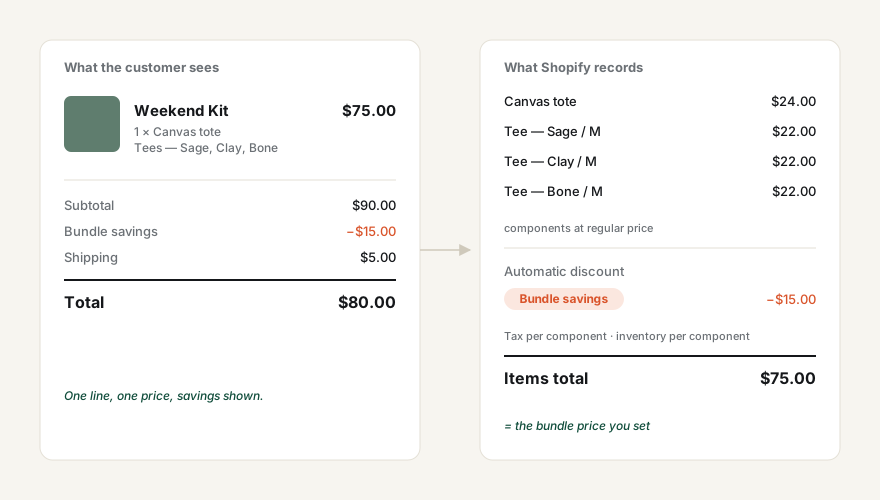
At checkout Shopify replaces the bundle line with its components at their regular prices. Better Bundles then applies an automatic discount named Bundle savings equal to the difference, so the total is exactly the bundle price you set. The discount is created for you at install; you can see it under Discounts in the admin but shouldn’t edit it.
Combining with other discounts
| Discount type | Combines with bundle savings? |
|---|---|
| Order discounts (e.g. 10% off your order) | Yes |
| Shipping discounts | Yes |
| Other product discounts | No. When both apply, Shopify keeps whichever saves the customer more, so a larger store-wide product discount replaces the bundle savings and the bundle is charged at its components’ regular prices minus that discount. |
Changing prices
- Bundle price — edit the parent product’s price. The app updates the definition automatically.
- Component prices — edit the component product. The saving shown to customers updates automatically; the bundle price does not change.
A bundle that costs more than its parts
Allowed, and flagged as Needs attention in the app so it doesn’t happen by accident. No negative discount is applied — the customer simply pays the bundle price.
Taxes and reports
Because checkout sees the real components, tax is calculated per component and sales reports attribute revenue to the component products, with the bundle savings recorded as a discount.