Mix-and-match bundles
Let the buyer choose — “pick any 3 tees” — with fixed items alongside if you like.
A mix-and-match bundle contains one or more customer choices: a set of options the buyer picks from, and how many they take. You can combine choices with fixed components in the same bundle.
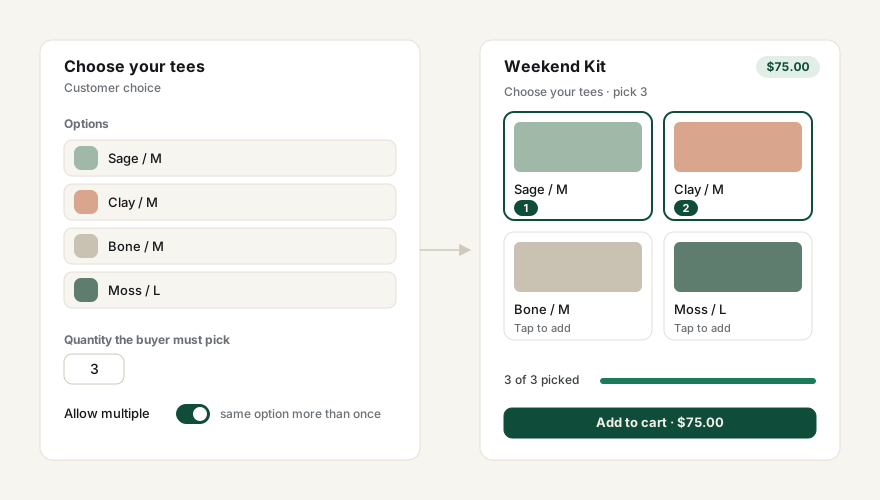
Add a choice
- In the bundle editor, under Customer choices (mix and match), press Add a choice.
- Name it — this is what the buyer sees, e.g. “Choose your tees”.
- Press Choose products and select the variants the buyer may pick from.
- Set the Quantity the buyer must take from this choice.
- Turn on Allow multiple if the buyer may take the same option more than once (3 × the same tee). Leave it off if the buyer chooses one option only.
Pricing
Because the buyer’s picks vary, the app shows the components total using the cheapest possible choice, so you can see the smallest saving a buyer could get. The customer always pays the bundle price you set on the product, whatever they pick.
Where buyers pick
- Online Store — the Better Bundles block renders the picker on the product page and won’t let the buyer add to cart until every choice is complete.
- POS — staff open the Bundles tile, choose the bundle, and pick the options with the customer. Picks can be edited on the cart line afterwards.
The customer’s picks travel with the cart line, so the order shows exactly which options were chosen and the right inventory is decremented.